



How to Activate Pochi Fuliza and Who Qualifies
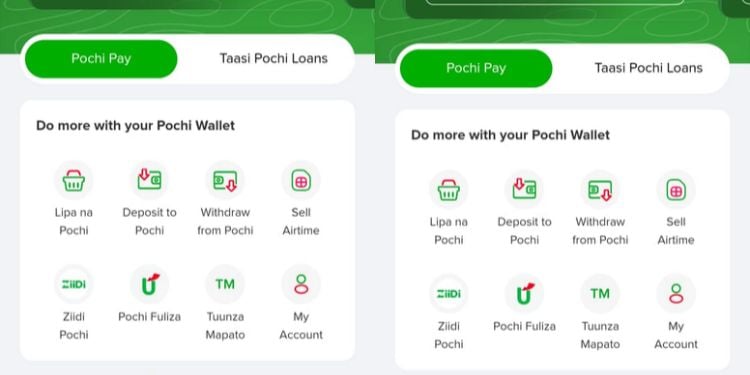
Safaricom launched the overdraft facility in Thika on October 22, expanding access to short-term mobile credit for small-scale traders.
Once activated, merchants receive an assigned overdraft limit they can access for eligible transactions.
“This is an overdraft facility available on the Pochi Wallet that allows Pochi la Biashara merchants to complete transactions when they have insufficient funds in their Pochi Wallet,” Safaricom explained.
To qualify for Pochi Fuliza, a merchant must be opted into Pochi la Biashara and have been active on Pochi for more than six months.
Additionally, to qualify, the user is required to use their registered Pochi Wallet number to access the service.
Business owners who meet the eligibility requirements can activate Pochi Fuliza through the USSD menu on the phone number registered to their Pochi Wallet.
Merchants should dial *334# and select option 8 (Pochi la Biashara), then option 4 (Pochi Fuliza).
To join, the user should select option 1 (Join Now), accept the Terms and Conditions, and enter their M-PESA PIN to complete the transaction.
Upon successful application, the user will receive a confirmation message including the Pochi Fuliza limit assigned to them.
After activation, you can use the assigned limit when making eligible transactions if your Pochi Wallet balance is insufficient.
When a transaction is initiated, the user receives a prompt showing the amount they are about to overdraw.
Merchants can choose to accept or reject the overdraft. If accepted, the transaction will be completed, subject to the applicable limit and transaction conditions.
The service can be used to pay a Buy Goods Till, send money to a mobile number or customer, and pay utility bills through a Pay Bill Till.
Also Read: Safaricom Explains Why Some Users May Never Get Higher Fuliza and M-Shwari Limits
Pochi Fuliza is repayable within 30 days, although merchants are encouraged to clear their outstanding overdrafts as soon as possible.
Repayment is made automatically through deductions from collections received in the merchant’s Pochi Wallet.
If the wallet lacks sufficient funds, the system keeps retrying to recover the outstanding amount until funds become available.
Merchants can also repay their overdrafts early once they receive funds in their wallets.
The facility offers a 48-hour interest-free period before the daily maintenance fee becomes applicable.
A 1% interest fee also applies to every disbursement, according to the provided product information.
Merchants who fail to repay may lose access to the facility, while their overdraft limits may be reduced.
According to the service providers, outstanding amounts that remain unpaid for 91 days after the due date may lead to listing with a Credit Reference Bureau (CRB), subject to applicable requirements.
Also Read: Safaricom Launches New System Deducting Money Automatically from M-PESA for Investment
The minimum transaction amount is KSh 1, while the maximum amount a merchant can access depends on the assigned Pochi Wallet overdraft limit.
To increase the limit, Safaricom encourages customers to pay you through your Pochi Wallet, noting that the more transactions, the more the limit grows.
“Minimum of KSh. 1 up to the merchant’s assigned Pochi Wallet overdraft limit. Encourage your customers to pay via Pochi Wallet. The more you transact, the more you grow your limit,” Safaricom directs.
However, an increase is not guaranteed and depends on the applicable eligibility and limit-assessment criteria.
Merchants can check their outstanding balance, mini statement, and repayment due date through the USSD menu.
To access these details, dial *334#, select option 8 for Pochi la Biashara, select option 4 for Pochi Fuliza, and then choose the Query Balance option.
To opt out of the service, merchants can dial *334#, select option 8 for Pochi la Biashara, choose option 4 for Pochi Fuliza, and select the opt-out option.
However, Safaricom emphasizes that users can opt out only after clearing all outstanding balances.
Business owners who need assistance with activation, repayment, or their assigned limits can contact Safaricom customer care by calling 100 or 200.
Alternatively, they can get help on Facebook: SafaricomPLC, on X: @SafaricomPLC, or at a Safaricom retail shop. Follow our WhatsApp Channel and X Account for real-time news updates.
Faith Mwangi is a digital news writer at The Kenya Times with a strong foundation in multimedia journalism. She specializes in current affairs, education, and social justice reporting, with a keen focus on underreported stories affecting communities. Driven by a commitment to authentic storytelling and ethical journalism, she continues to grow in the dynamic digital media landscape. She can be reached at [email protected]
Your email address will not be published. Required fields are marked *
Save my name, email, and website in this browser for the next time I comment.
Please enter your username or email address to reset your password.
Reported by thekenyatimes.com.
Read Original Report at thekenyatimes.com ↗ WhatsApp
Comments (0)
No comments yet. Be the first to share your opinion!